If you forget your portal password, please follow these steps:
Access the phone portal through https://portal.nvgvoip.ca
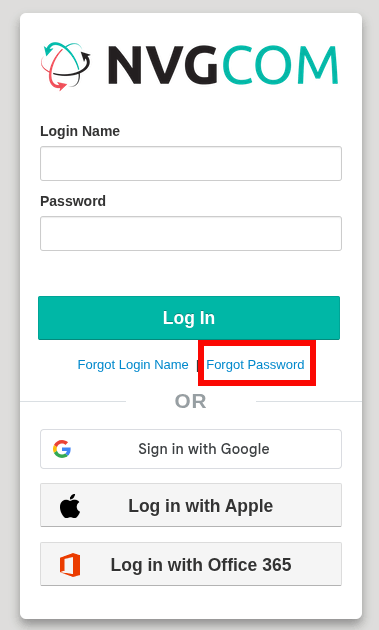
You will see a login page.
Click on the Forgot Password link.
You will then see a screen like this:
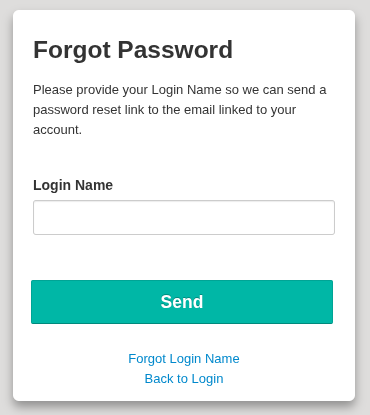
Your Login Name is your_extension@company_domain.nvgvoip.ca.
Example: 101@noname.nvgvoip.ca
Please use the Forgot Login Name or email us at support@nvgcom.ca, and we will assist you.
Click Send after you enter your login name.
After clicking send, you will see a message above:

It will send to the email assigned to your username (extension).
Once you receive an email from noreply@iplogin.ca, you will see this email content:
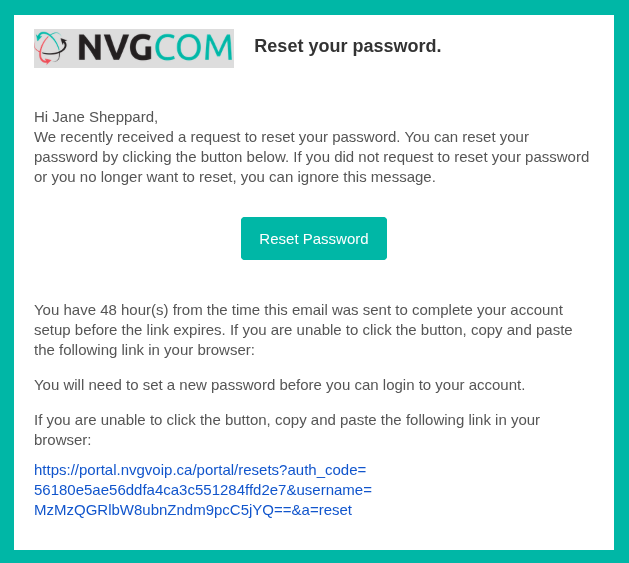
Click on the Reset Password within the green field or copy and paste the link below if it does not work for your browser.
It will open a page in your default browser where you can set the new password.
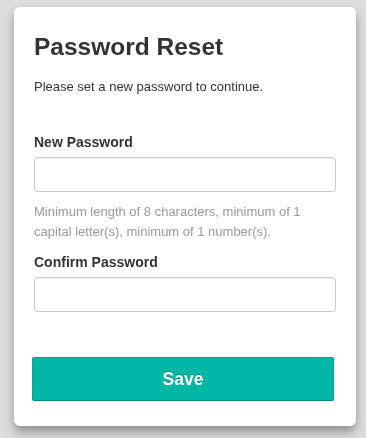
Once you enter the password twice while following the password guideline, click on save.
This will take you to the login page, and it will show a message above:

Login normally.
Was this article helpful?
That’s Great!
Thank you for your feedback
Sorry! We couldn't be helpful
Thank you for your feedback
Feedback sent
We appreciate your effort and will try to fix the article